[jQuery] 레이아웃
목차5
jQuery의 레이아웃 메소드
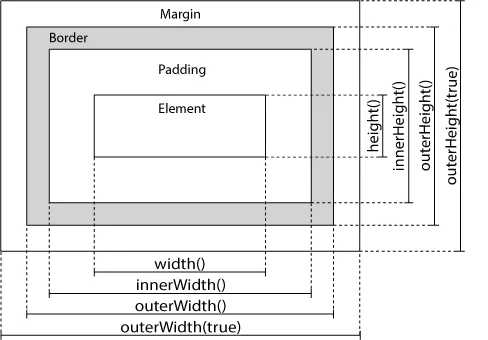
Layout 작업을 위한 몇 가지 중요한 메소드가 있다.
- width()
- height()
- innerWidth()
- innerHeight()
- outerWidth()
- outerHeight()
width() / height()
width() 메소드는 요소의 padding, border, margin를 제외한 width를 설정하거나 반환한다.
height() 메소드는 요소의 padding, border, margin를 제외한 height를 설정하거나 반환한다.
지정된 요소 <div>의 width와 height를 반환받기:
코드
$("button").click(function(){
  var txt = "";
  txt += "Width: " + $("#div1").width() + "</br>";
  txt += "Height: " + $("#div1").height();
  $("#div1").html(txt);
});
innerWidth() / innerHeight()
innerWidth() 메소드는 요소의 padding을 포함한 width를 반환한다.
innerHeight() 메소드는 요소의 padding을 포함한 height를 반환한다.
지정된 요소 <div>의 width와 height를 반환받기:
코드
$("button").click(function(){
  var txt = "";
  txt += "Width: " + $("#div1").width() + "</br>";
  txt += "Height: " + $("#div1").height();
  $("#div1").html(txt);
});outerWidth() / outerHeight()
outerWidth() 메소드는 요소의 padding, border를 포함한 width를 반환한다.
outerHeight() 메소드는 요소의 padding, border를 포함한 height를 반환한다.
지정된 요소 <div>의 외부 width/height를 반환받기:
코드
$("button").click(function(){
  var txt = "";
  txt += "Outer width: " + $("#div1").outerWidth() + "</br>";
  txt += "Outer height: " + $("#div1").outerHeight();
  $("#div1").html(txt);
});
outerWidth(true) 메소드는 요소의 padding, border, margin을 포함한 width를 반환한다.
outerHeight(true) 메소드는 요소의 padding, border, margin을 포함한 height를 반환한다.
코드
$("button").click(function(){
  var txt = "";
  txt += "Outer width (+margin): " + $("#div1").outerWidth(true) + "</br>";
  txt += "Outer height (+margin): " + $("#div1").outerHeight(true);
  $("#div1").html(txt);
});
추가적인 width() / height() 사용법
document(HTML 문서)와 window(브라우저 뷰포트)의 width와 height를 반환받기:
코드
$("button").click(function(){
  var txt = "";
  txt += "Document width/height: " + $(document).width();
  txt += "x" + $(document).height() + "\\n";
  txt += "Window width/height: " + $(window).width();
  txt += "x" + $(window).height();
  alert(txt);
});
지정된 요소의 width와 height를 설정하기:
코드
$("button").click(function(){
  $("#div1").width(500).height(500);
});
반응형