Emotion
목차21
Emotion이란?
Emotion.js는 CSS-in-JS의 종류 중 하나로 JavaScript 안에서 스타일을 작성할 수 있게 해준다.
emotion.js는 주로 프레임워크와 관련없이 사용하는 Framework Agnostic과 React 두 가지 방식으로 사용된다.
emotion 설치
# Framework Agnostic
$ npm install @emotion/css

# React
$ npm install @emotion/react
import 하기
emotion.js를 사용해야 할 컴포넌트에 먼저 import를 해야한다.
/** @jsxImportSource @emotion/react */
import { jsx, css } from '@emotion/react';
여기서 /** @jsxImportSource @emotion/react */는 babel에게 React.createElement 대신 jsx를 jsx라는 함수로 변환하라는 뜻이기 때문에 단순히 주석이라고 생각해서 쓰지 않는다면 @emotion/react가 적용되지 않는다.
기본 구조
공식 문서에 있는 예문으로 emotion의 기본 구조를 styled-components와 비교해서 살펴보자.
emotion.js
/** @jsxImportSource @emotion/react */
import { css, jsx } from '@emotion/react'

const divStyle = css`
  background-color: hotpink;
  font-size: 24px;
  border-radius: 4px;
  padding: 32px;
  text-align: center;
  &:hover {
    color: white;
  }
`

export default function App() {
  return <div css={divStyle}>Hover to change color.</div>
}
styled-components
import styled from 'styled-components'

const DivStyle = styled.div`
  background-color: hotpink;
  font-size: 24px;
  border-radius: 4px;
  padding: 32px;
  text-align: center;
  &:hover {
    color: white;
  }
`

export default function App() {
  return <DivStyle>Hover to change color.</DivStyle>
}
이렇게 보면 크게 다른 점은 없지만 jsx 안에서 이게 어떤 태그인지 바로 알 수 있다는 장점이 있다.
만약 emotion.js를 styled-components처럼 사용하고 싶다면 @emotion/styled를 설치하면 된다.
$ npm install @emotion/styled @emotion/react이렇게 하면
import styled from '@emotion/styled'

const DivStyle = styled.div`
  background-color: hotpink;
  font-size: 24px;
  border-radius: 4px;
  padding: 32px;
  text-align: center;
  &:hover {
    color: white;
  }
`

export default function App() {
  return <DivStyle>Hover to change color.</DivStyle>
}
이처럼 styled-components를 사용하는 것처럼 emotion을 사용할 수 있다.
재사용
emotion 역시 styled-components와 마찬가지로 스타일을 입힌 것을 component로 만들어서 어느 곳에서든 재사용할 수 있다.
/** @jsxImportSource @emotion/react */

const P = props => (
  <p
    css={{
      margin: 0,
      fontSize: 12,
      lineHeight: '1.5',
      fontFamily: 'sans-serif',
      color: 'blue',
    }}
    {...props}
  />
)

const ArticleText = props => (
  <P
    css={{
      fontSize: 20,
      fontFamily: 'Georgia, serif',
      color: 'darkgray',
    }}
    {...props}
  />
)

export default function App() {
  return (
    <div>
      <P>Using P component</P>
      <ArticleText>Using ArticleText component</ArticleText>
    </div>
  )
}
같은 CSS 속성이 있다면 가장 최근 값으로 적용된다.
Nested
emotion.js에서도 Nested 사용이 가능하다.
/** @jsxImportSource @emotion/react */
import { jsx, css } from '@emotion/react'

const paragraph = css`
  color: turquoise;

  a {
    border-bottom: 1px solid red;
    cursor: pointer;
  }
`
render(
  <p css={paragraph}>
    Some text.
    <a>A link with a bottom border.</a>
  </p>
)
MediaQuery
반응형은 일반적으로 사용하는 미디어쿼리와 동일하게 사용할 수 있다.
/** @jsxImportSource @emotion/react */
import { jsx, css } from '@emotion/react'

render(
  <p
    css={css`
      font-size: 30px;
      @media (min-width: 420px) {
        font-size: 50px;
      }
    `}
  >
    Some text!
  </p>
)
Global Theme 설정
styled-components와 유사한 방법으로 Global Theme를 설정할 수 있다.
GlobalStyle.js
import { Global, css } from '@emotion/react'

const style = css`
  * {
    margin: 0;
    padding: 0;
  }

  body {
    box-sizing: border-box;
  }
`

const GlobalStyle = () => {
  return <Global styles={style} />
}

export default GlobalStyle
theme.js
export const size = {
  largest: '75em', // 1200px
  large: '56.25em', // 900px
  medium: '37.5em', // 600px
  small: '31.25em', // 500px
  smallest: '25em', // 400px
}

const theme = {
  mainColor: '#0000ff',
  mq: {
    laptop: `@media only screen and (min-width: ${size.largest})`,
    tablet: `@media only screen and (min-width: ${size.large})`,
    mobile: `@media only screen and (min-width: ${size.small})`,
  },
}

export default theme
index.js
import ReactDOM from 'react-dom'
import { BrowserRouter } from 'react-router-dom'

import { ThemeProvider } from '@emotion/react'
import theme from '@styles/theme' // 위치한 경로 설정
import GlobalStyle from '@styles/global' // 위치한 경로 설정

import App from './App'

ReactDOM.render(
  <BrowserRouter>
    <ThemeProvider theme={theme}>
      <GlobalStyle />
      <App />
    </ThemeProvider>
  </BrowserRouter>,
  document.getElementById('root')
)
Emotion.js의 장점
- CSS-in-JS 형식으로 스타일을 사용할 수 있다.
- className이 자동으로 부여되기 때문에 스타일이 겹칠 염려가 없다.
- 재사용이 가능하다.
- porps, 조건 등에 따라 스타일을 지정할 수 있다.
- vendor-prefixing, nested selectors, mediaqueries 등을 적용할 수 있어 작성이 간편하다.
- styled-component 사용방식과 css prop 기능을 지원하여 확장에 용이하다.
- styled-component 보다 파일 사이즈가 작고 SSR시 서버 작업이 필요없다.
css props 기능
- 인라인 스타일을 작성하지만 클래스가 되며 기존 style 속성은 HTML 인라인 스타일로 주입이 된다.
- emotion jsx에서 제공해주는 css 속성을 활용하면 이를 클래스로 변환해준다.
- 기존 인라인으로 사용할 수 없었던 media query, pseudo selector, nested selector 등을 사용할 수 있다.
<div css={{color: "red"}} /> {/* 혹은 */} <div css={css`color: red`} />
<div style={{color: "red"}}/>- css props를 결합하여 복잡한 스타일링을 진행할 수 있다.
<div css={[style, themes[theme], sizes[size]]} />

const themes = {
  primary: css`
    color: red;
  `,
  secondary: css`
    color: blue;
  `
}
const sizes = {
  small: css`
    fontSize: 0.75rem;
  `,
  medium: css`
    fontSize: 1rem;
  `
}- 위와 같이 css 변수를 조립하여 컴포넌트 스타일링을 진행할 수 있다.
type ThemeType = keyof typeof themes;
type SizeType = keyof typeof size;- typescript로 자동 타입지정까지 할 수 있는 이점이 있다.
Storybook을 활용하여 본격적으로 디자인 시스템 구축하기
SSR
- SSR에서 별도의 설정 없이 동작이 된다.
- 반면 styled-components 같은 경우 ServerStyleSheet을 설정 해야 한다.
Emotion – Server Side Rendering
styled-components: Advanced Usage
Emotion & Styled-Components
제공하는 기능 비교
| library | Attaching Props | Media Queries | Global Styles | Nested Selectors | Server Side Rendering | Theming Support | Composition |
|---|---|---|---|---|---|---|---|
| styled-components | Yes | Yes | Yes | Yes | Yes | Yes | Yes |
| emotion | Yes | Yes | Yes | Yes | Yes | Yes | Yes |
- 전반적인 스타일 기능은 똑같다.
- 둘다 sass문법을 사용하기에 스타일 문법에도 차이가 없다.
사용 트렌드
The State of CSS 2022: CSS-in-JS
@emotion/core vs @emotion/react vs styled-components | npm trends
용량과 성능
블로그, 사이트들을 참고하면 대게 emotion이 styled-components보다 조금 가볍고 빠르다고 한다.
먼저 https://bundlephobia.com/ 를 참고해서 최신 라이브러리 번들 사이즈를 살펴보자.
Bundlephobia | Size of npm dependencies
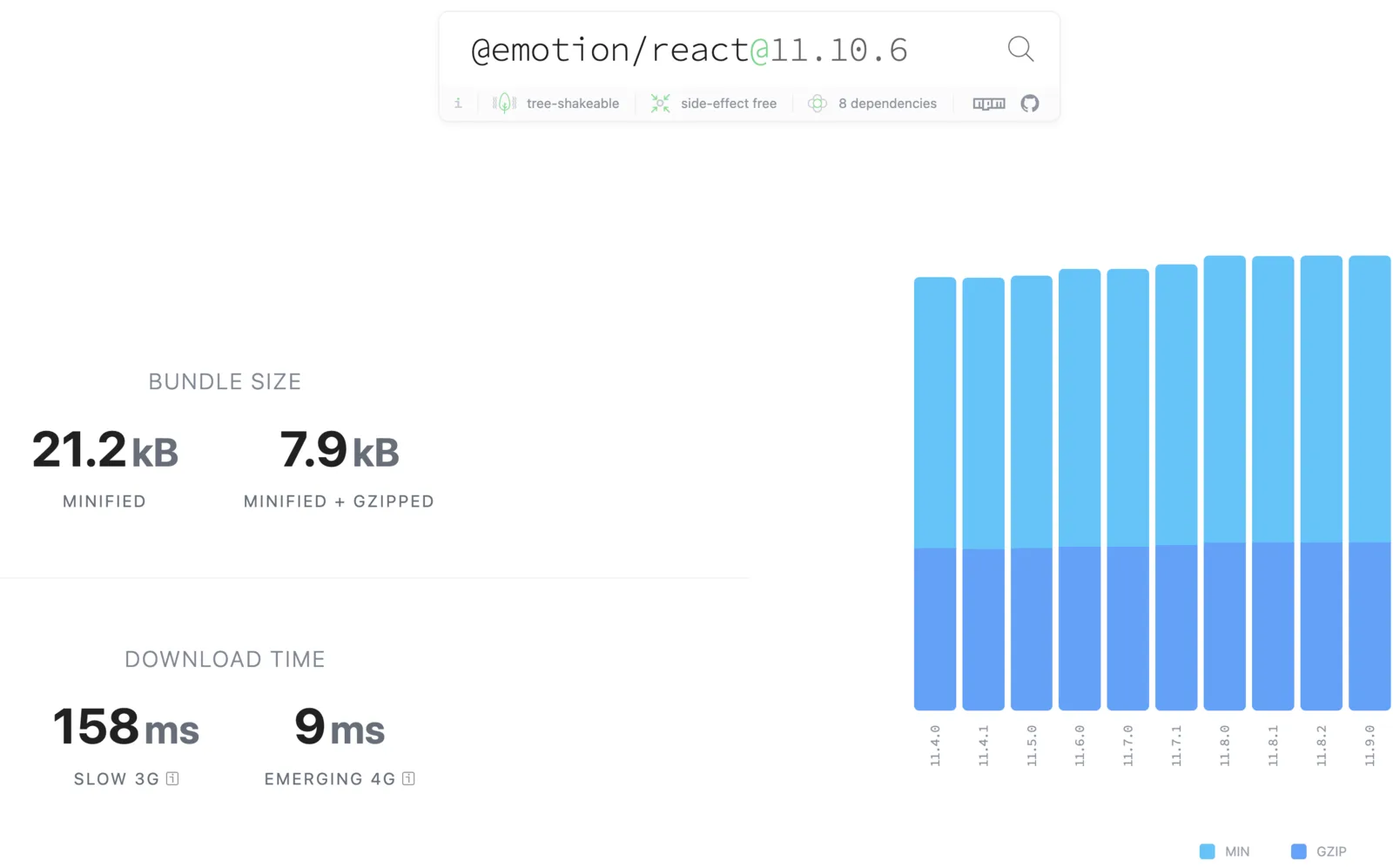
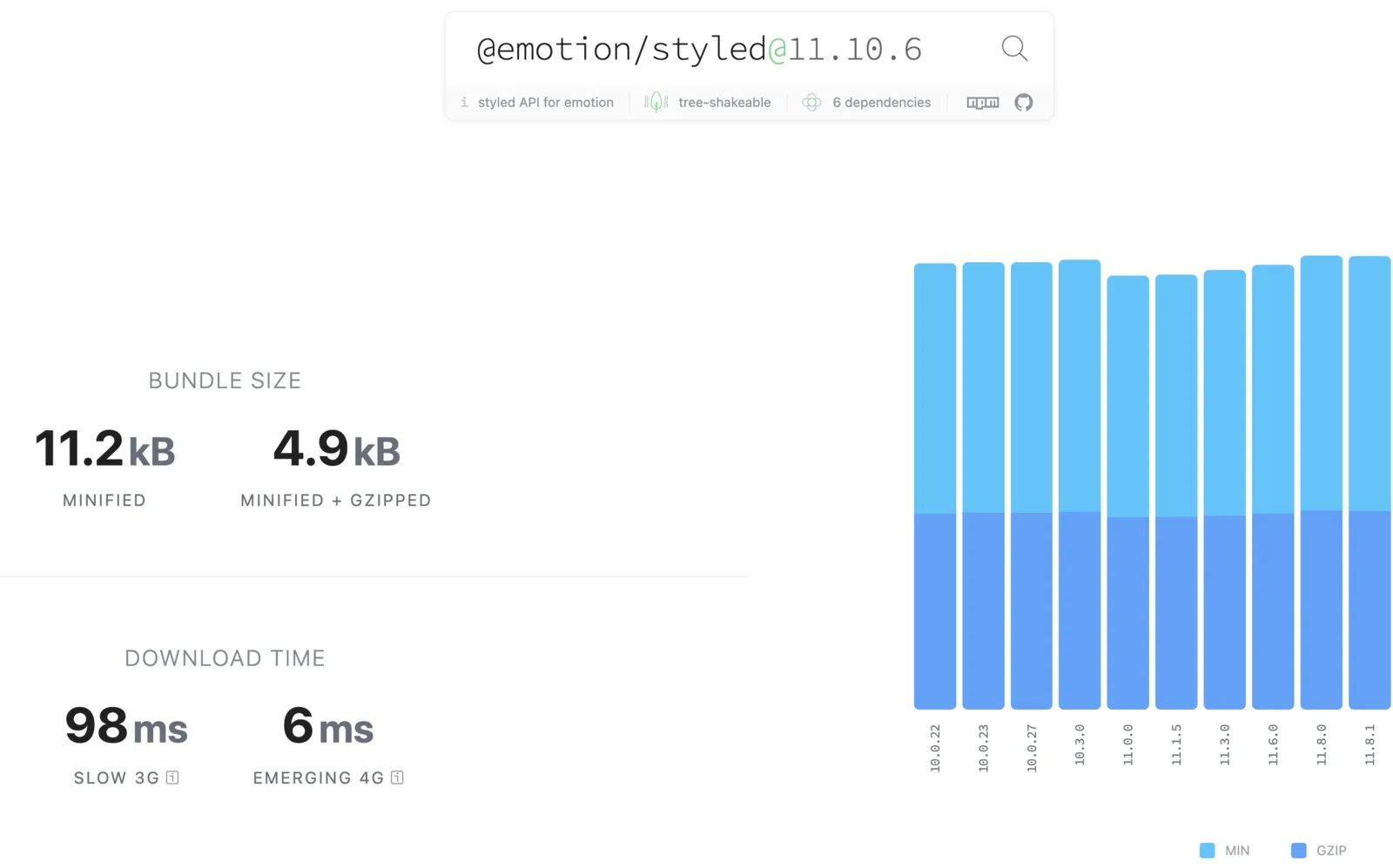
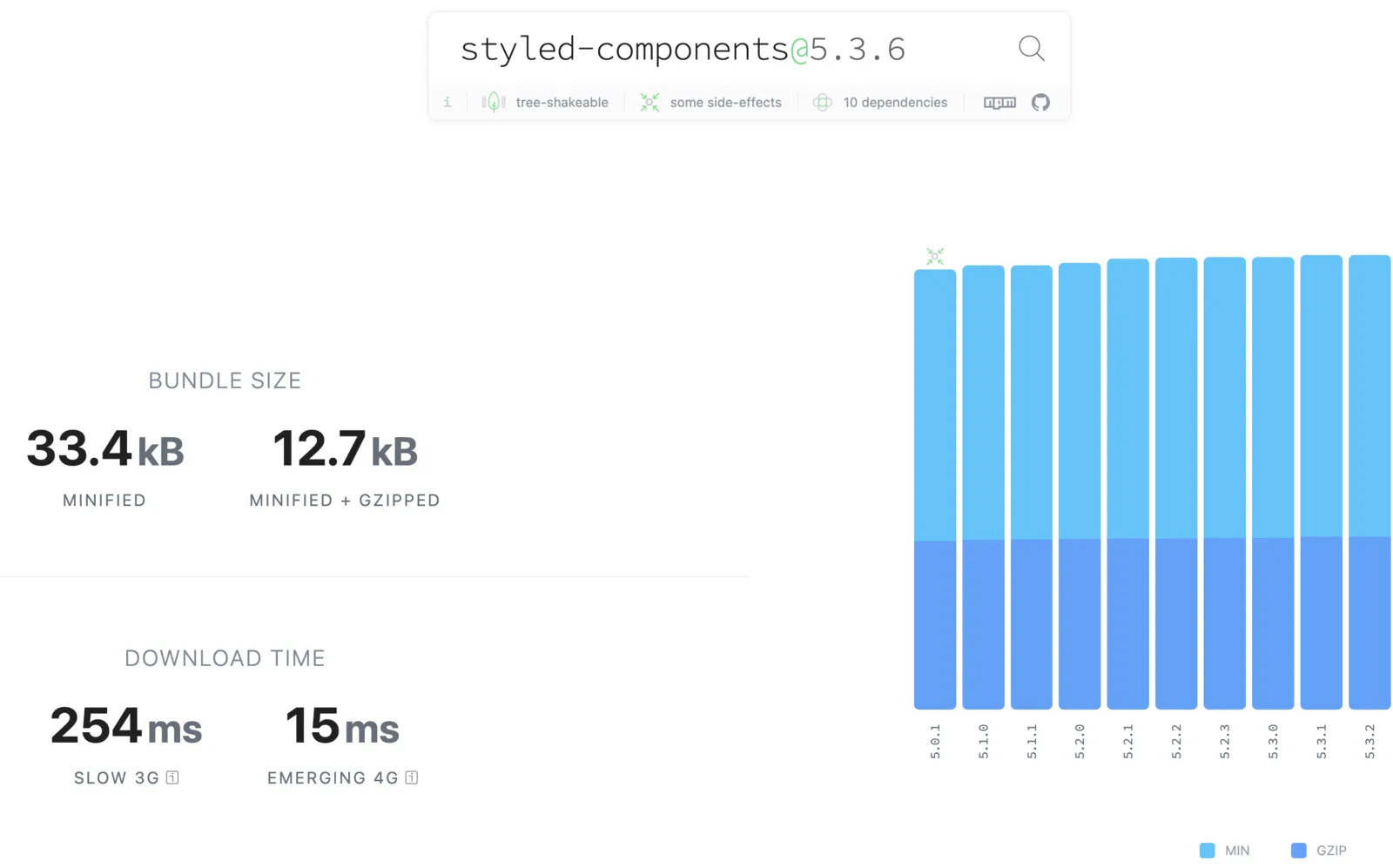
보통 emotion을 사용한다면 위 두가지 라이브러리를 모두 사용한다.
눈대중으로 보면 라이브러리 용량이 비슷해보인다. (1~2 kb 차이)
다만 @emotion/react만 사용한다면 용량이 1.5배 정도 차이가 난다.
그렇다면 속도 차이는 어떨까?
다양한 자료를 참고해보면 emotion이 근소하게 더 빠르다.
GitHub - A-gambit/CSS-IN-JS-Benchmarks
Styled components vs Emotion js: A performance perspective
결론은 성능상 둘은 유의미하게 차이가 나지 않는다.
emotion의 퍼포먼스가 전반적으로 더 좋게 나오고 있고 라이브러리 버전에 따라서 차이가 발생할 수 있다.
마무리
- 유의미한 성능차이가 있는 것이 아니다. 라이브러리 버전에 따라 달라질 수 있다.
- 팀에서 더 익숙한 것을 사용하면 될 것 같다.
- emotion의 css props로 css를 더 활용도 높게 조립할 수 있다.
- SSR에서는 emotion 세팅시 더 간편하다.
반응형